

In this tutorial, you will learn how to create a beautiful water lily in Adobe Illustrator. basic drawing tools will be used: like the Rectangle tool, Ellipse and the drawing pen. The gradient mesh will be used to color. A nice lesson easy to follow for users who already have a good knowledge of the program.
Related Posts
11
Aug2014

Material Swap in Cinema 4D – Tutorial
This video tutorial shows the process of exchanging material or transitioning from one facility to another in Cinema 4D. An interesting exercise to make a 3d object change ‘skin’ in…
13
Nov2016

Draw a Melted Typography in Illustrator
In this interesting video tutorial we will see how to draw a dripping vector text using the Adobe Illustrator graphics program. A quick and easy exercise that requires a little…
04
Feb2015

Create a Complex Curvy Grid Structure in Cinema 4D – Tutorial
This video tutorial demonstrates the process for creating a sinuous and complex grid structure within Cinema 4D. A beautiful exercise to create ‘complicated’ structures with Cinema 4D.
03
Feb2015

Create a Glamorous Cinema Poster in Adobe Illustrator
Gli elementi che andremo a creare nel tutorial che seguiremo sono ben noti e riconosciuti da tutti coloro che amano il cinema. Vedremo il processo per realizzare un emozionante e…
16
Dec2015
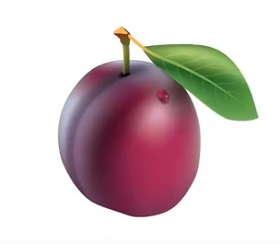
Create a Detailed Plum with Mesh Tool in Illustrator
This video tutorial shows you how to create a plum fruit using Illustrator’s Mesh Tool. A very powerful tool for creating vector figures that simulate reality very well.
14
Dec2015

Create Glossy 3D Logo Design in Adobe Illustrator
This video tutorial will walk you through creating a 3D logo in Adobe Illustrator. He will also explain how to obtain a ‘glossy’ effect by creating points of light and…
